PassGo membership programme
Quick Help
PassGo is open to anyone aged 18 and above with a valid Malaysian mobile number.
While anyone can create an account, our Drive-to-Earn rewards programme is rolling out in phases, starting with selected eligible vehicle models. Support for additional vehicle brands and models is currently in development. Stay tuned for official announcements and in-app updates!
PassGo is built especially for drivers in Malaysia, so you will need a Malaysian mobile number (+60) to register. However, if you are travelling overseas, you can still open the app, check your rewards, and manage your account anywhere.
No password is needed to log in.
Enter your registered Malaysian mobile number, tap send, and log in with the 6-digit verification code sent to your phone to log in securely.
Go to Profile > My Points > Points Centre to check your full record of Points earned, redeemed, refunded or adjusted.
If you still don’t recognise a transaction, contact PassGo Customer Support through Profile > Settings > Feedback and include the relevant transaction details.
You can also email support@passgo.my or contact us via WhatsApp at +60 19-9003026, Monday to Friday, 9.00 am–6.00 pm.
Go to Profile > My Points > Points Centre to review your earnings, redemptions, and refunds.
Some rewards, including Drive-to-Earn Points, may take time to appear.
If the expected Points are still missing after the stated processing period, contact PassGo Customer Support through Profile > Settings > Feedback and include the relevant transaction details.
You can also email support@passgo.my or contact us via WhatsApp at +60 19-9003026, Monday to Friday, 9.00 am–6.00 pm.
Refresh the My Rewards page first.
If the reward still does not appear after a few minutes, contact PassGo Customer Support through Profile > Settings > Feedback and include your PassGo ID and the relevant redemption details.
You can also email support@passgo.my or contact us via WhatsApp at +60 19-9003026, Monday to Friday, 9.00 am–6.00 pm.
Digital vouchers, codes and rewards are generally issued immediately. Once a redemption has been confirmed, it cannot normally be cancelled, exchanged or refunded.
Please take a moment to check the reward and redemption details before confirming.
If something goes wrong because of a system issue, or if another exception applies under the PassGo terms, we'll arrange a refund where applicable.
Go to Profile > My Orders and check whether the order appears in your account.
If payment or Points were deducted but no order is shown, contact PassGo Customer Support through Profile > Settings > Feedback and include your payment or transaction details.
The quickest way is through the PassGo app:
- In-App Feedback: Open the PassGo app, go to Profile > Settings > Feedback, select your issue category, describe your inquiry, and submit. Our support team will investigate and respond directly within the app.
- Email: support@passgo.my
- WhatsApp: +60 19-9003026 Monday to Friday, 9.00 am–6.00 pm.
- For account, order or Points enquiries, please include your PassGo ID and any relevant order or transaction details.
Still have a question?
Reach the PassGo team and we'll help you get back on the road.
Joining PassGo - General
Anyone aged 18 or above with a valid Malaysian mobile number (+60) can create a PassGo account.
While everyone is welcome to join, the Drive-to-Earn rewards programme will be introduced in phases, starting with selected eligible vehicle models. More vehicle brands and models will be added over time, so stay tuned to our official announcements and in-app updates.
No. You can create a PassGo account without owning a Proton vehicle. However, Drive-to-Earn is currently available only for supported eligible vehicles.
No. PassGo membership is completely free.
PassGo membership is currently the same for all members. If tier-based benefits are introduced in the future, full details will be shared via in-app announcements and updated programme rules.
Yes. PassGo reserves the right to suspend or terminate accounts that breach our Terms of Use, or those involved in fraudulent or abusive activities.
Joining PassGo - Vehicle Linking
Drive-to-Earn currently supports eligible Proton e.MAS vehicles only. We plan to introduce support for additional vehicle brands and models as the platform expands. Keep an eye on the app for future announcements!
For supported Proton e.MAS vehicles, vehicle authorisation is completed through the Proton e.MAS App.
In the PassGo app, tap Link Vehicle, which will automatically open the Proton e.MAS App. Or you can also open the Proton e.MAS App directly. Follow the prompts to complete the link and wait for the verification status to update. Make sure you are signed in to the Proton e.MAS App using the same Malaysian mobile number registered to your PassGo account.
Your eligible vehicle will be linked to your PassGo account once authorisation is complete. If the authorisation option is not available or verification fails, check that both apps use the same Malaysian mobile number and contact PassGo Customer Support through Profile > Settings > Feedback. You can also email support@passgo.my or contact us via WhatsApp at +60 19-9003026, Monday to Friday, 9.00 am–6.00 pm.
More vehicle-authorisation methods will be introduced in the future.
A Vehicle Identification Number, or VIN, is the unique identification number assigned to your vehicle by the manufacturer.
Your VIN can usually be found:
- On the vehicle, including near the lower corner of the windscreen; or
- On your vehicle registration certificate or ownership documents.
Your VIN helps PassGo identify and verify your eligible vehicle.
For Drive-to-Earn, vehicle authorisation also allows PassGo to receive the eligible driving information required to calculate your rewards.
Yes, where supported.
If you own multiple eligible Proton e.MAS vehicles, make sure they are registered under the same mobile number in the Proton e.MAS App.
Once PassGo access has been authorised, eligible vehicles associated with that mobile number can be linked to your PassGo account.
A vehicle can only be linked through the authorised vehicle account associated with it.
First:
- Check that your vehicle details in the Proton e.MAS App are correct.
- Make sure the mobile number registered there matches your PassGo mobile number.
- Check whether PassGo access was previously authorised under another account.
If the issue continues, contact PassGo Customer Support through Profile > Settings > Feedback and provide your VIN and registered mobile number.
You can also email support@passgo.my or contact us via WhatsApp at +60 19-9003026, Monday to Friday, 9.00 am–6.00 pm.
Check the following:
- Your vehicle has been successfully added and verified in the Proton e.MAS App.
- The mobile number registered in the Proton e.MAS App matches your PassGo mobile number.
- Your vehicle is currently eligible for PassGo vehicle linking.
If everything is correct and verification still fails, contact PassGo Customer Support through Profile > Settings > Feedback with your VIN and registered mobile number.
You can also email support@passgo.my or contact us via WhatsApp at +60 19-9003026, Monday to Friday, 9.00 am–6.00 pm.
If you sell your vehicle, follow the vehicle manufacturer’s process to remove or update your vehicle account and authorisations in the Proton e.MAS App.
PassGo Points you have already earned will remain in your PassGo account.
A vehicle cannot be linked to two PassGo accounts at the same time.
If vehicle ownership changes, the previous authorisation must first be removed according to the applicable vehicle account process before the new owner can link the vehicle.
Still have a question?
Reach the PassGo team and we'll help you get back on the road.
Your PassGo Account
- Create Your PassGo Account: Sign up directly via the PassGo app using your Malaysian mobile number, or complete registration through integrated partner journeys via Proton e.MAS App.
- Link Your Vehicle for Drive-to-Earn: Creating an account lets you explore PassGo, but earning driving rewards requires an extra step. Authorise your vehicle through the Proton e.MAS App, just make sure you use the exact same mobile number for both accounts.
Drive-to-Earn is rolling out in phases for eligible vehicle models. More supported brands and models are coming soon!
Yes. You can access and use your PassGo account while outside Malaysia.
However, selected rewards, campaigns, merchant services and physical deliveries may only be available in Malaysia.
You can find your PassGo ID in the Profile section of the PassGo App.
No. Each Malaysian mobile number can only be registered to one PassGo account.
Make sure the additional eligible vehicle is registered to the same mobile number in the Proton e.MAS App. Once PassGo access is authorised, supported vehicles linked to that mobile number will be linked with your PassGo account. No additional steps are required.
Go to Profile > Settings > My profile to update supported account details such as your profile picture, nickname and email address.
Some verified information may require assistance from PassGo Customer Support to change.
Go to Profile > My Points to see your current PassGo Points balance and to review your earnings, redemptions, refunds, expiry and adjustments.
Check Profile > My Points > Points Centre first.
If the expected Points are not shown after the applicable processing period, contact PassGo Customer Support through Profile > Settings > Feedback with the relevant activity or transaction details.
PassGo does not use account passwords.
Log in using the 6-digit SMS verification code sent to your registered mobile number.
There is no password reset process because PassGo uses SMS verification for login.
If you are not receiving your SMS verification code, check your mobile number and network connection before trying again.
If you need to update your registered mobile number, contact PassGo Customer Support through Profile > Settings > Feedback.
Additional verification may be required to protect your account.
Account deletion is permanent and cannot be reversed.
Deleting your account will permanently remove your profile, trip records, saved vehicles and all personal data associated with your account.
You can submit a deletion request instantly from within the PassGo mobile app:
- Open the PassGo app and log in to your account
- Tap the Profile icon on the bottom navigation bar
- Go to Account Settings
- Select Delete Account
- Read and confirm the deletion consequences
- Complete identity verification as prompted
- Submit your deletion request
If you need further assistance, feel free to reach out to our support team via WhatsApp.
Still have a question?
Reach the PassGo team and we'll help you get back on the road.
Earning PassGo Points
PassGo Points are the reward points used across the PassGo ecosystem.
You can earn Points through eligible activities such as driving, completing tasks, participating in campaigns and spending with participating partners.
Points can be used for eligible rewards, products, services and offers available through PassGo.
Depending on availability, PassGo Points can be earned through:
- Eligible Drive-to-Earn activity;
- Tasks and challenges in the PassGo app;
- Purchases with participating partners;
- Special campaigns and promotions
We are constantly expanding the PassGo ecosystem, so keep an eye out for new ways to earn!
There are several ways to earn PassGo Points.
| Task Type | Name | Reward Points | Task Description |
|---|---|---|---|
| New User Tasks | Vehicle Linking Reward | 300 | Receive 300 PassGo Points after completing your first eligible vehicle link. |
| First Time Login Reward | 100 | Receive 100 PassGo Points after your first login. | |
| Daily Tasks | Drive-to-Earn |
Calculated by mileage | 1. Eligibility: Users who enroll in the activity on the same day and complete valid driving 2. Reward rule: 1km = 1 point; daily cap: 150 points 3. Reward bonus: Earn additional rewards based on your safe driving behavior and participation in operational activities (coming soon) 4. Points will be calculated based on driving data and activity rules, and automatically credited to your account the next day |
| Activity Tasks | Mileage Treasure Hunt | Distributed based on treasure chest opening probability | Unlock one station treasure chest for every 100km of cumulative driving. Up to 30 treasure chests can be unlocked during the activity period. Opening a treasure chest grants points or virtual voucher rewards. Users open chests for free, no points consumed, manual click required to open |
Participating partner earning opportunities will be introduced as the PassGo ecosystem expands.
These may include automotive, mobility and lifestyle partners such as vehicle servicing, charging, fuel, parking, car washes, dining and retail rewards.
Eligible merchants, earning rates and campaign conditions will be shown in the PassGo app when available.
It depends on the activity.
- For Drive-to-Earn, you must join the day’s activity before your eligible driving begins. Drive-to-Earn Points cannot normally be added retrospectively if you did not join in time.
- Other tasks and Challenge campaigns must be completed within their stated campaign period.
If you believe Points are missing because of a technical issue, contact PassGo Customer Support through Profile > Settings > Feedback.
Yes, selected earning activities have specific caps:
- Drive-to-Earn: Subject to a daily limit of 150 Points.
- Campaigns & Tasks: May feature specific milestone or reward limits (e.g. up to 30 Treasure Chests for the Mileage Treasure Hunt).
- Partner Purchases: Generally do not have overall limits, though individual merchants or promotions may set daily transaction caps.
Any applicable limit will always be clearly displayed in the relevant task or campaign details in the app.
PassGo Points can be used for eligible rewards and purchases across the PassGo ecosystem.
Depending on availability, you may be able to use Points to:
- Redeem products and vouchers in the PassGo Rewards Store
- Redeem eligible vehicle services and lifestyle rewards
- Participate in selected campaigns and experiences; or
- Unlock selected member benefits and future platform features
Available options may be added as the PassGo ecosystem grows.
Yes. In some situations, previously awarded Points may be adjusted or removed.
Points may be adjusted where:
- A purchase is refunded or cancelled;
- Points were credited incorrectly;
- Fraudulent or abusive activity is identified;
- Points have expired under the applicable validity period;
- An adjustment is required under the PassGo Terms of Use or applicable campaign terms.
Any adjustment will appear in your Points Centre.
Still have a question?
Reach the PassGo team and we'll help you get back on the road.
Using PassGo Points
Open PassGo Mall, choose an eligible reward or product and select how many Points you would like to use where partial redemption is available.
Review the details carefully before confirming.
Digital vouchers or codes will normally appear in the app after successful redemption. Physical products will require valid delivery information.
You can redeem your PassGo Points for a wide range of rewards directly within the app, including:
- Digital Vouchers & Gift Cards: Instant e-vouchers for popular dining, shopping, and lifestyle brands.
- Automotive Care & Accessories: Special car care products, and service vouchers.
- Lifestyle Products: Merchandise and curated lifestyle items.
- Exclusive Member Rewards: Member-only rewards, partner privileges, and special experiences.
Our rewards catalogue is continuously updated with new items and seasonal offers, so be sure to check the Mall tab regularly!
Yes! For eligible items, you can use your PassGo Points to cover a portion of the purchase and pay the remaining balance using any accepted payment method. The applicable Points value and limits will be clearly displayed at checkout.
Yes! Once you apply your PassGo Points to an eligible transaction, you can settle the remaining amount using supported payment methods available at checkout, such as online banking, credit/debit cards, or e-wallets.
It depends on the item or promotion. Most rewards can be redeemed as long as you have enough Points in your balance, but certain limited-time offers or items may have transaction caps. Any minimum or maximum limits will be shown before you confirm your order.
If a transaction is unsuccessful, your deducted Points will normally be refunded to your balance automatically within 1–3 working days.
If your Points have not been returned after the stated period, contact PassGo Customer Support through Profile > Settings > Feedback and provide your order or transaction details.
Still have a question?
Reach the PassGo team and we'll help you get back on the road.
More about PassGo Points
No. PassGo Points belong to the individual PassGo account in which they were earned.
No. Points can only be earned through PassGo activities, such as driving, completing tasks, spending with participating partners and taking part in official campaigns.
Buying, selling or trading PassGo Points privately or through unauthorised channels is not permitted. If such activity is identified, PassGo may remove improperly obtained Points and take action on the account in accordance with the PassGo Terms of Use.
No. PassGo Points have cannot be withdrawn or exchanged for cash.
They can only be used for eligible rewards, products, services and offers within the PassGo ecosystem.
No. PassGo Points are currently non-transferable.
If gifting or Points-transfer features are introduced in the future, details will be announced in the PassGo app.
Yes. PassGo Points are currently valid for 24 months from the date they are credited.
You can check the relevant expiry information in your Points Centre. PassGo may also send reminders before eligible Points expire.
Confirmed redemptions are generally final.
Points will not normally be returned because you changed your mind or selected the wrong reward.
Different rules may apply if a transaction fails, an item becomes unavailable or a refund is required under the applicable PassGo Mall policy.
Go to Profile > My Points > Points Centre.
You’ll be able to see Points earned, redeemed, refunded, adjusted and expired, together with the relevant transaction details.
PassGo may update Points earning, redemption or programme rules as the ecosystem develops.
If a material change affects existing members, PassGo will provide notice through the app or other appropriate official channels in accordance with the applicable terms.
Still have a question?
Reach the PassGo team and we'll help you get back on the road.
Drive-to-Earn
Drive-to-Earn rewards eligible PassGo members for everyday driving.
To take part, simply join the daily Drive-to-Earn activity in the PassGo app before you drive. Once you've joined for the day, your eligible driving activity will be tracked automatically and you'll earn PassGo Points based on the programme rules.
Remember to join the daily activity each day you'd like to earn Points.
To participate, you must:
- Have an eligible PassGo account;
- Link an eligible private passenger vehicle;
- Complete the required vehicle-data authorisation; and
- Hold a valid Malaysian driving licence where required by the programme rules.
At launch, Drive-to-Earn supports eligible Proton e.MAS models. More vehicles may be added over time.
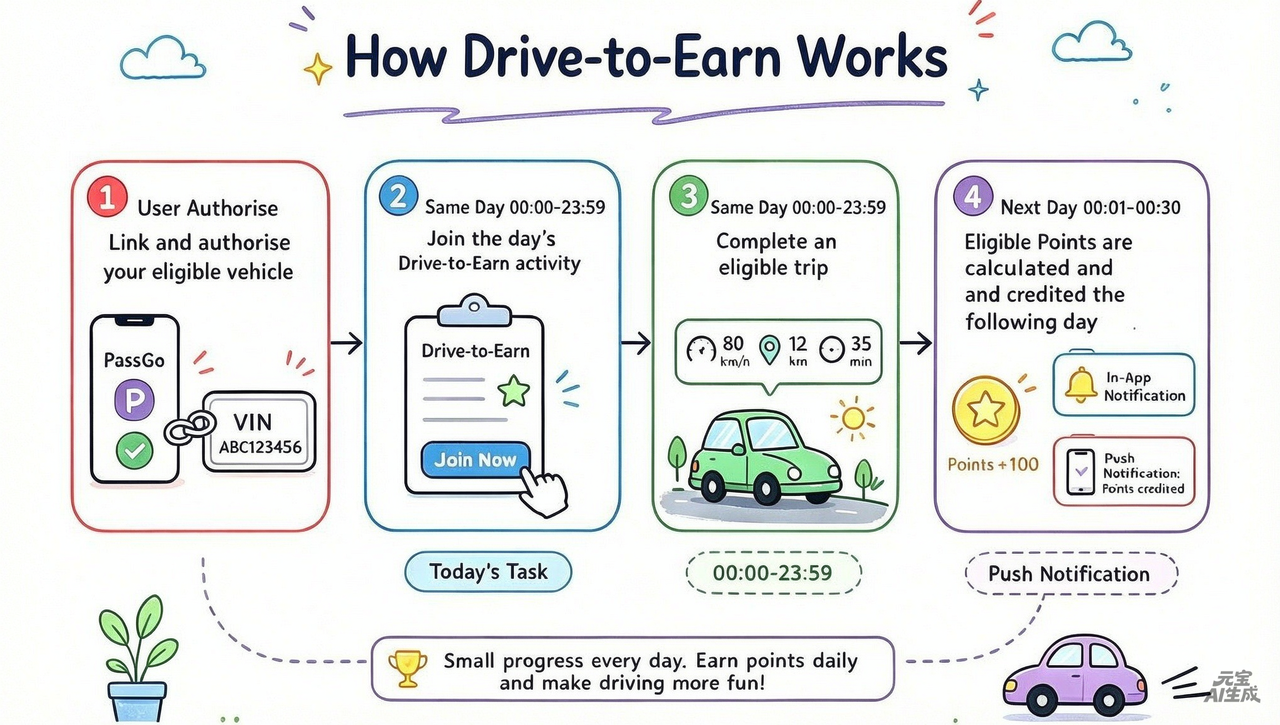
Getting started is easy.
- Make sure your vehicle is linked and authorised
- Open Drive-to-Earn in the PassGo app
- Review and accept the applicable terms and data consent.
- Join the day’s Drive-to-Earn activity before driving
- Start driving! Your PassGo Points will be credited to your account the following day.
Friendly Reminder: Remember to tap and join Drive-to-Earn each day to earn points.
Driving earns 1 PassGo Point per kilometre, up to the daily limit shown in the Drive-to-Earn activity.
You can find the latest earning rules in the Drive-to-Earn section of the PassGo app.
For supported vehicles, driving data is securely synchronised through the vehicle manufacturer’s connected-vehicle system after you authorise access.
PassGo only collects the vehicle information required to operate and verify the Drive-to-Earn programme in accordance with our applicable privacy and data policies.
No. Once you have joined the day’s Drive-to-Earn activity and your vehicle is linked, supported driving data is synchronised automatically.
There are a few common reasons why Points may not have been credited:
- Missed Daily Check-in: You didn't tap to join the daily Drive-to-Earn activity in the app before you started driving.
- Vehicle Linking Issue: Your vehicle wasn't successfully linked or connected to your PassGo account.
- Authorisation Interrupted: Vehicle data sharing permissions were disconnected or turned off in settings.
- Overnight Batch Processing: Drive-to-Earn Points are processed overnight once driving data syncs, so daily earnings arrive early the next morning.
If your Points are still missing after the usual processing window, please reach out to Customer Support via Profile > Settings > Feedback (or email support@passgo.my), and we'll gladly look into it for you!
Contact PassGo Customer Support through Profile > Settings > Feedback and provide the relevant date, trip details and any supporting information available. Our team will review the activity and assist you.
Yes. You can stop participating in Drive-to-Earn at any time. Once you disable the feature or unlink your vehicle, we'll stop collecting driving data for Drive-to-Earn and you'll no longer earn PassGo Points from future trips.
Any PassGo Points you've already earned will remain in your account.
Your privacy and security are our top priorities. PassGo handles all driving data in strict accordance with Malaysia's Personal Data Protection Act (PDPA) and our Privacy Policy.
Your driving data is used solely to:
- Calculate Drive-to-Earn rewards;
- Verify eligible driving activity;
- Improve our services and programme experience;
- Support fraud prevention and platform security
Personal data is handled in accordance with PassGo’s Privacy Policy and applicable Malaysian data-protection requirements.
Still have a question?
Reach the PassGo team and we'll help you get back on the road.
PassGo Challenge - General
PassGo Challenges is limited-time, in-app campaigns that reward you for completing specific milestones. Depending on the campaign, rewards may include PassGo Points, Treasure Chests, vouchers or other benefits.
Eligibility varies by campaign. Some Challenges may be available to all PassGo members, while vehicle-based Challenges require an eligible linked vehicle.
Check each Challenge page for its eligibility requirements.
Each Challenge has its own start and end date. The campaign period and any countdown will be shown on the relevant Challenge page.
PassGo Challenge - Mileage Treasure Hunt
Mileage Treasure Hunt is a limited-time PassGo Challenge running from 29 September 2026 to 28 December 2026.
During the campaign, eligible driving distance counts towards mileage milestones. Every 100 km reached unlocks a Treasure Chest containing a reward.
The further you drive during the campaign, the more chests you can unlock, up to 30 chests
- Make sure your vehicle is linked and authorised
- Open the Mileage Treasure Hunt campaign page
- Drive as usual to accumulate distance
- Reach 100 km milestone
- Open your unlocked Treasure Chests before the campaign ends!
You unlock one Treasure Chest for every 100 km of eligible accumulated driving during the campaign, up to 30 Treasure Chests.
For example:
100 km = first Treasure Chest
200 km = second Treasure Chest
300 km = third Treasure Chest
You can unlock up to 30 Treasure Chests (3,000 km total) per account during the campaign period.
Yes. They operate on distinct reward rules, allowing you to earn progress and rewards for both simultaneously.
No. Once your vehicle is authorised, your mileage syncs automatically in the background. You do not need to upload data manually or open the app daily to record your drives.
No. Mileage Treasure Hunt does not require you to open the app every day for mileage to be recorded.
You will still need to open the app to view your progress and claim unlocked Treasure Chests.
Mileage syncs periodically every few hours rather than in real time. If your progress hasn't updated:
- Check your connection: Ensure your vehicle data authorization is active under account settings.
- Allow time to sync: Drive as usual and check back after the next scheduled update.
If the mileage remains incorrect, contact PassGo Customer Support through Profile > Settings > Feedback.
Yes. You can link multiple eligible vehicles to a single PassGo account. Distance driven on any linked vehicle will contribute to your milestone total.
Chests contain PassGo Points, digital vouchers, and exclusive perks. Contents vary by chest, and your exact reward will be revealed when opened!
No. You can open your unlocked chests whenever you like during the campaign. Just remember to claim all your chests before the event ends, unopened rewards won't be accessible after the campaign.
Eligible rewards are credited after you open the Treasure Chest. PassGo Points can be checked under My Points, while vouchers and other digital rewards can be checked under My Rewards.
No. Each unlocked chest can only be opened once.
No. Unopened chests cannot be claimed once the campaign page goes offline. Be sure to open all your unlocked chests before the event period ends!
Still have a question?
Reach the PassGo team and we'll help you get back on the road.
PassGo Mall - General
PassGo Mall is the in-app marketplace where you can use PassGo Points, supported online payment methods, or a combination of both to redeem eligible products and rewards.
Browse available items, choose your preferred option and complete the order at checkout.
We offer three types of products in the store:
- Physical products
Automotive accessories, merchandise and lifestyle products delivered to eligible addresses. - Virtual Direct Top-ups: mobile or digital services top-ups delivered directly to the selected account.
- Digital Vouchers & Gift Cards: Codes or digital cards made available in the app after successful purchase or redemption.
Product availability may vary depending on account eligibility, vehicle status, campaign participation, location, stock availability or other offer conditions.
You may be able to access PassGo Mall while travelling, but PassGo Mall is currently designed for the Malaysian market.
Physical-product delivery is limited to supported Malaysian locations, and selected products or services may only be available in Malaysia.
Yes, we are always looking to expand our rewards catalog. You can share your product suggestions with us anytime by going to Profile > Settings > Feedback in the app and selecting the feedback category.
PassGo Mall - Placing an Order
Depending on the product, you may be able to pay using:
- PassGo Points;
- Credit card;
- Supported e-wallets;
- FPX online banking; or
- A combination of PassGo Points and an eligible online payment method.
The payment methods available for your order will be shown at checkout.
PassGo Mall - After You Order
You can check your order status under Profile > My Rewards in the app. If your order status appears as Processing or Completed, your order was successfully placed.
If your account was charged but no order is listed, contact Customer Support via Profile > Settings > Feedback with your payment details.
Once an order has been paid, delivery details cannot normally be edited directly in the app.
If you need to correct your address, contact PassGo Customer Support as soon as possible through Profile > Settings > Feedback or contact Us via WhatsApp at +60 19-9003026 (Monday to Friday, 9.00 am–6.00 pm).
If your order has not been shipped yet, our support team will do their best to help update your delivery details manually.
Go to Profile > My Orders.
Here you can filter and view your orders by status.
Go to Profile > My Orders, select the relevant order and open Order Details.
You’ll be able to see the order summary, payment information and available receipt details.
We know plans can change! Here is how order cancellations work on PassGo:
- Unpaid Orders: You can cancel an unpaid order from the Order Details page. Unpaid orders may also be cancelled automatically after the payment window expires.
- Paid Orders: Once payment has been successfully processed, the order enters fulfilment and cannot normally be cancelled directly.
For certain physical products, you may be able to submit a Request Refund after payment, subject to the applicable refund policy.
Yes. You will receive push notifications and in-app order updates when important order events occur, such as shipment, delivery or refund processing.
Once your order has been shipped, go to Profile > My Orders > Order Details.
Where available, you’ll see the delivery company and tracking number for your shipment.
PassGo Mall - Refunds and Returns
If PassGo is unable to fulfil an item, the affected amount will be refunded automatically.
PassGo Points
Points used for the unavailable item will be refunded directly back to your PassGo account.
Online payment
Cash amounts will be refunded to the original payment method. The time taken for the refund to appear will depend on the payment provider, bank or card issuer.
Refund eligibility depends on the product type, payment method and reason for the request.
Physical products paid using Points + online payment
For an approved refund:
- The cash portion may be refunded to the original payment method;
- The Points portion is generally non-refundable, except where PassGo is unable to fulfil the order or another applicable exception applies.
Physical product orders paid entirely with PassGo Points
Physical products paid entirely with Points redemptions are generally final once confirmed and cannot be cancelled or refunded unless PassGo is unable to fulfil the order or another exception applies under the relevant terms.
Promotional items or free rewards
Promotional items, gifts and rewards received at no charge are generally non-refundable.
Digital vouchers, gift cards and direct top-ups
Once successfully issued or processed, digital vouchers, gift cards, codes and direct top-ups cannot normally be cancelled, returned or refunded.
If delivery or processing fails because of a confirmed system error, PassGo may process an automatic refund or reversal where applicable.
For eligible physical products, you may submit a refund request where:
- The item was not received;
- The parcel was lost in transit;
- Delivery was rejected or could not be completed;
- You received the wrong item;
- The item arrived damaged;
- The item has a verified defect or quality issue; or
- Another eligible reason applies under the relevant PassGo Mall policy.
Refund approval is subject to review.
Submit your request within 48 hours of receiving the item, where applicable.
- Open the PassGo app
- Go to Profile > My Rewards
- Select the relevant order
- Tap Request Refund
- Choose the appropriate refund type:
Refund Only — where you do not need to return an item, such as an eligible non-delivery or lost-in-transit case.
Return and Refund — where you received the item and need to return it. - Select your refund reason.
- Provide the requested information and supporting evidence.
- Submit your request for review.
You can check the status of your request under Profile > My Rewards > Refunds.
Refund Only
Use this option where there is no physical item to return, such as an eligible non-delivery or lost-in-transit case.
Return and Refund
Use this option where you have received the physical item and will need to be returned before the refund can be completed.
The option available to you may depend on the reason for your request and the outcome of PassGo’s review.
To help our team review and process your request as quickly as possible, please provide:
- Your order number;
- The reason for the refund;
- A clear description of the issue; and
- Photos, videos or other supporting evidence where relevant.
If your item arrived damaged or incorrect, make sure to take close-up photos of the product, the parcel box, and the carrier shipping label before submitting your request.
Yes. For Return and Refund requests, you must return the item first.
Please follow the step-by-step return instructions provided in the app or sent by PassGo Customer Support. Once the returned item is received and inspected by our team, your refund will be processed promptly.
Unless the return relates to a defect, damage or incorrect item, returned products should generally be:
- Unused;
- In their original condition;
- Returned with the original packaging, accessories and supplied items; and
- Packed securely for return delivery.
PassGo may reject a return if the item has been used, damaged after delivery, altered or returned incomplete, unless the return relates to an eligible product-quality issue.
You will need to pay for return delivery upfront. However, if our team confirms that your return is due to a product defect or quality issue, PassGo may issue bonus PassGo Points to offset your approved return delivery costs.
Verified product defect or quality issue
If PassGo confirms that the return is due to a product defect or quality issue, PassGo may provide bonus PassGo Points to compensate for the approved return-delivery cost.
Other return reasons
For returns unrelated to a confirmed defect or quality issue, return-delivery charges are generally not compensated.
Please keep your return-delivery receipt until your case has been completed.
The treatment of the original delivery fee depends on the reason for the refund and the applicable refund policy. Where an entire order cannot be fulfilled by PassGo, eligible delivery charges may be refunded where applicable.
If our team verifies that the return is due to a product defect or quality issue, PassGo operations may issue bonus points to compensate you for the prepaid shipping fees.
For other return reasons, delivery charges may not be refundable.
Our team will review refund requests within 5 working days after receiving the information required to assess your request. If additional information, evidence or a physical return is required, the review may take longer.
We will update you through the PassGo app when the status of your request changes.
PassGo Points
Eligible Points refunds will be returned to your PassGo account after the refund is processed.
Online payment
Eligible cash refunds will be sent to your original payment method.
The time taken for the funds to appear depends on your bank, card issuer or payment provider.
No. Cash refunds are normally returned to the original payment method used for the purchase.
PassGo Points refunds, where applicable, are returned to the PassGo account used for the order.
If your request is not approved, the refund status will be updated in the PassGo app.
Where available, the reason for the decision will also be provided.
If you believe important information was missed, contact PassGo Customer Support through Profile > Settings > Feedback and provide any additional supporting details.
You can also email support@passgo.my or contact us via WhatsApp at +60 19-9003026, Monday to Friday, 9.00 am–6.00 pm.
Go to: Profile > My Rewards > Refunds
Select the relevant request to view the latest status and available refund details.
Our Customer Support team is here to assist! To help us review your case as quickly as possible, please reach out via Profile > Help Centre with the following details:
- Your PassGo ID;
- Your order number;
- The item concerned;
- The reason for your request; and
- Photos, videos or other supporting information where relevant.
You can also email support@passgo.my or contact us via WhatsApp at +60 19-9003026, Monday to Friday, 9.00 am–6.00 pm.
Providing these details upfront allows our team to investigate and resolve your request much faster.
Still have a question?
Reach the PassGo team and we'll help you get back on the road.